Modules in AI harnesses
Over the past month, I’ve been working on cutting costs in one of my apps that uses LLM APIs, and I’ve come up with a pretty interesting way to reduce them for most users.
In many tools today, like Claude Code, Codex, Pi and other harnesses (coding or not), a big chunk of usage comes from the system prompt and the tool schemas.
The numbers
The average user message in my app is 53 tokens. The system prompt and tool schemas together average 11,988 tokens, roughly 226 times more.
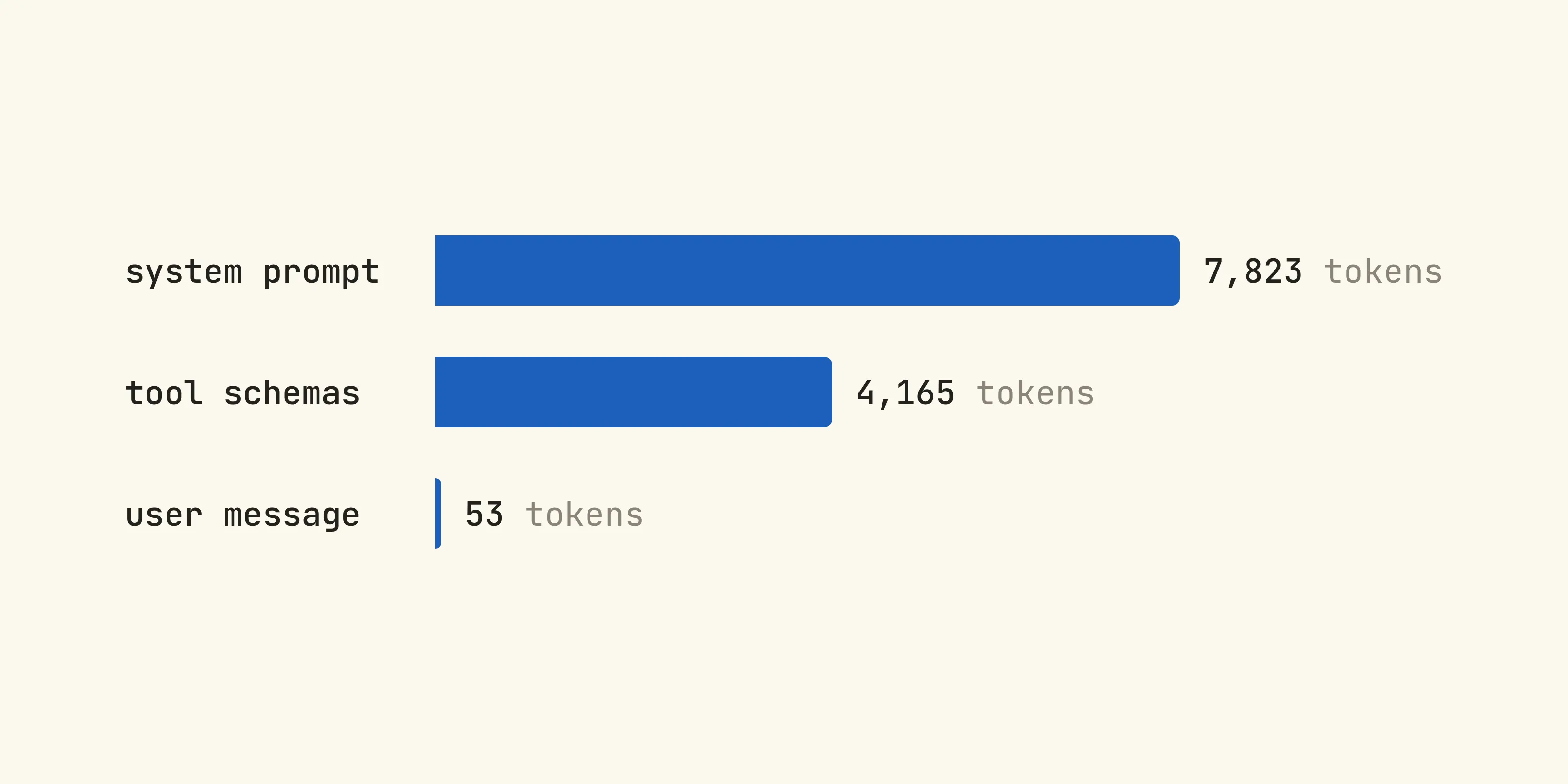
Seeing this, I started looking into ways to cut down on tokens. First I simplified the tool schemas and stripped unimportant details from the tool results, which did save some money, but not as much as I’d hoped for.
Next, I switched to explicit caching for the model I’m using, which at the time of writing is OpenAI’s GPT-6 Luna. Its pricing:
| Tokens | Price per 1M |
|---|---|
| Input | $0.10 |
| Output | $0.50 |
| Cache hit | $0.01 |
| Cache write | $0.125 |
OpenAI’s cache currently lives for 30 minutes. With explicit caching, most requests get a cache hit on at least the system prompt and tool schemas, so that part of each request costs:
When the cache expires, the next request pays the cache write price instead:
The cache is shared between users, so one request pays for the write and every request after it gets the cheaper rate until the cache expires again.
Looking at this, I still wasn’t satisfied. I wanted more optimizations and more modularity, so I came up with modules ✨
Modules
What we can do is use OpenAI’s additional_tools parameter, which is barely documented and barely mentioned anywhere online. But only deferring the tools isn’t a good idea. More likely than not you refer to those tools in your system prompt, and if the model can’t see them it can get confused and start hallucinating tool calls. So we also defer the parts of the system prompt that talk about those tools.
That’s basically what a module is, a set of tools plus the instructions for using them. Everything else stays in what I call the core, which is the stuff every request needs plus a short list of the modules the model can load. If we split the same 11,988 tokens into a core and three example modules, it looks something like this:
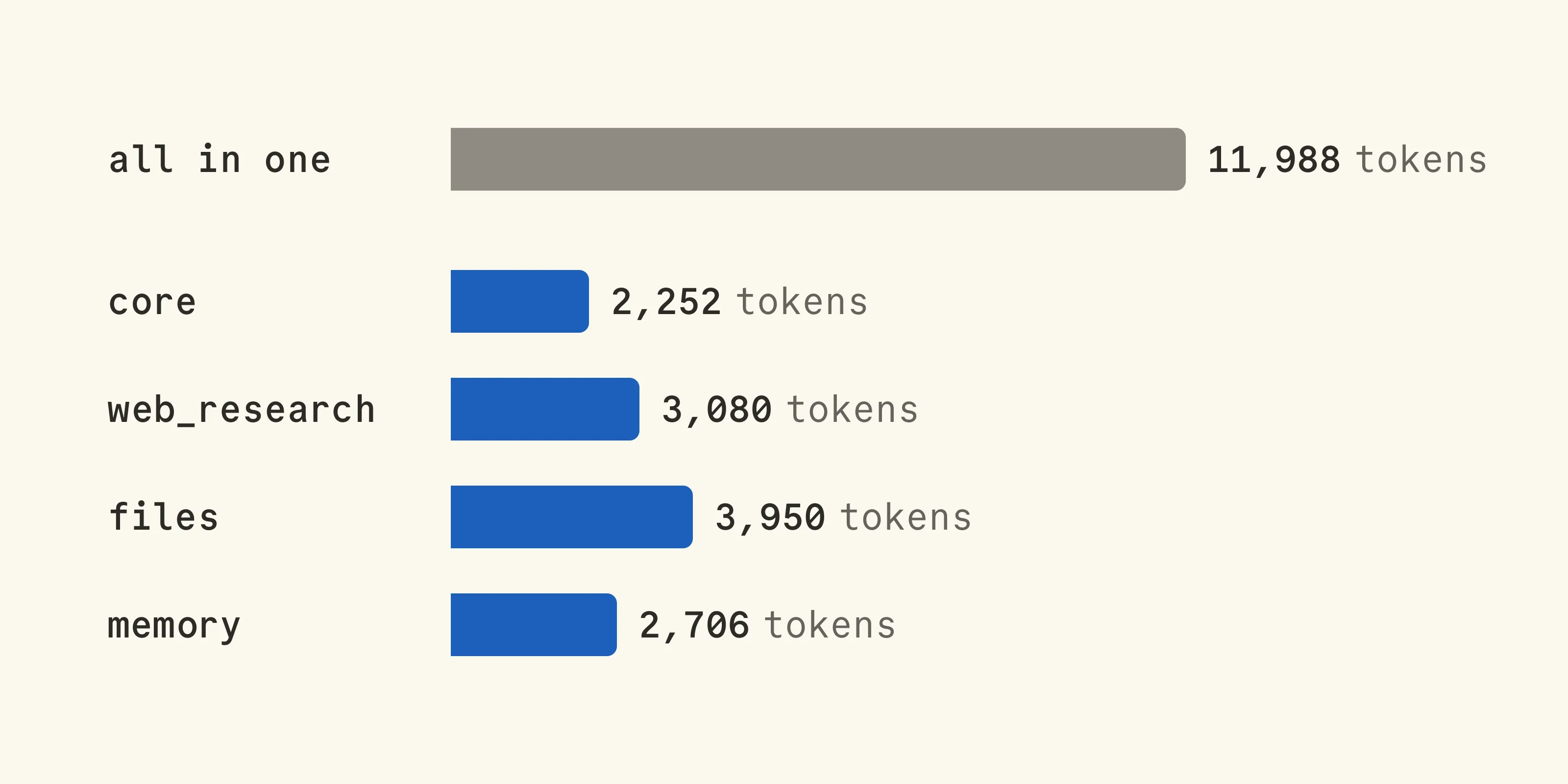
Now only the core gets sent with every request, and a module only costs something once a conversation actually needs it.
What a module looks like
Here’s a web research module as an example. It has a name, a one-line summary, the instructions that used to sit in the system prompt, and its tools:
export const webResearch = { name: "web_research", summary: "Search the web and read pages.", instructions: `## Web researchUse web_search to find sources, then fetch_page to read theones that matter. Prefer primary sources, and cite every claimwith its URL.`, tools: [ { type: "function", name: "web_search", description: "Search the web. Returns URLs and snippets.", parameters: { type: "object", properties: { query: { type: "string" } }, required: ["query"], additionalProperties: false, }, }, { type: "function", name: "fetch_page", description: "Fetch a page and return its main text.", parameters: { type: "object", properties: { url: { type: "string" } }, required: ["url"], additionalProperties: false, }, }, ],};The core
The core prompt lists all the modules with their summaries, and we give the model one extra tool called load_module so it can load a module when it needs one:
const modules = [webResearch, files, memory];
const corePrompt = `${baseInstructions}
## ModulesSome capabilities live in modules.Call load_module before using one:${modules.map((m) => `- ${m.name}: ${m.summary}`).join("\n")}`;
const loadModule = {  type: "function",  name: "load_module",  description: "Load a module's tools and instructions.",  parameters: {    type: "object",    properties: {      name: { type: "string", enum: modules.map((m) => m.name) },    },    required: ["name"],    additionalProperties: false,  },};
This way the model always knows which modules exist, even before it has loaded any of them, so it doesn’t have to guess.
For caching, we put an explicit breakpoint at the end of the core. One gotcha here is that the core prompt has to go in a developer message instead of instructions, since top-level instructions can’t have a breakpoint:
const input = [  {    role: "developer",    content: [      {        type: "input_text",        text: corePrompt,        prompt_cache_breakpoint: { mode: "explicit" },      },    ],  },  { role: "user", content: userMessage },];
const response = await client.responses.create({  model: "gpt-6-luna",  prompt_cache_options: { mode: "explicit" },  tools: [loadModule, ...coreTools],  input,});input.push(...response.output);
You’d probably also want a breakpoint on the latest message so the conversation itself gets cached too. A request can write up to four of them.
Loading a module
When the model calls load_module, we answer the call and then add the module right after it, an additional_tools item with the module’s tools and a developer message with its instructions:
for (const call of response.output) {  if (call.type !== "function_call") continue;  if (call.name !== "load_module") continue;
  const { name } = JSON.parse(call.arguments);  const module = modules.find((m) => m.name === name)!;
  input.push(    {      type: "function_call_output",      call_id: call.call_id,      output: `Loaded ${module.name}.`,    },    {      type: "additional_tools",      role: "developer",      tools: module.tools,    },    {      role: "developer",      content: [        {          type: "input_text",          text: module.instructions,          prompt_cache_breakpoint: { mode: "explicit" },        },      ],    },  );}
The breakpoint goes on the instructions message because additional_tools items can’t have one. Also, when you send the conversation again on the next turn, keep the module items where they were, since the tools only exist from that point in the input onward.
So for a conversation that loads web_research on its first turn, this is what the model sees, in order:
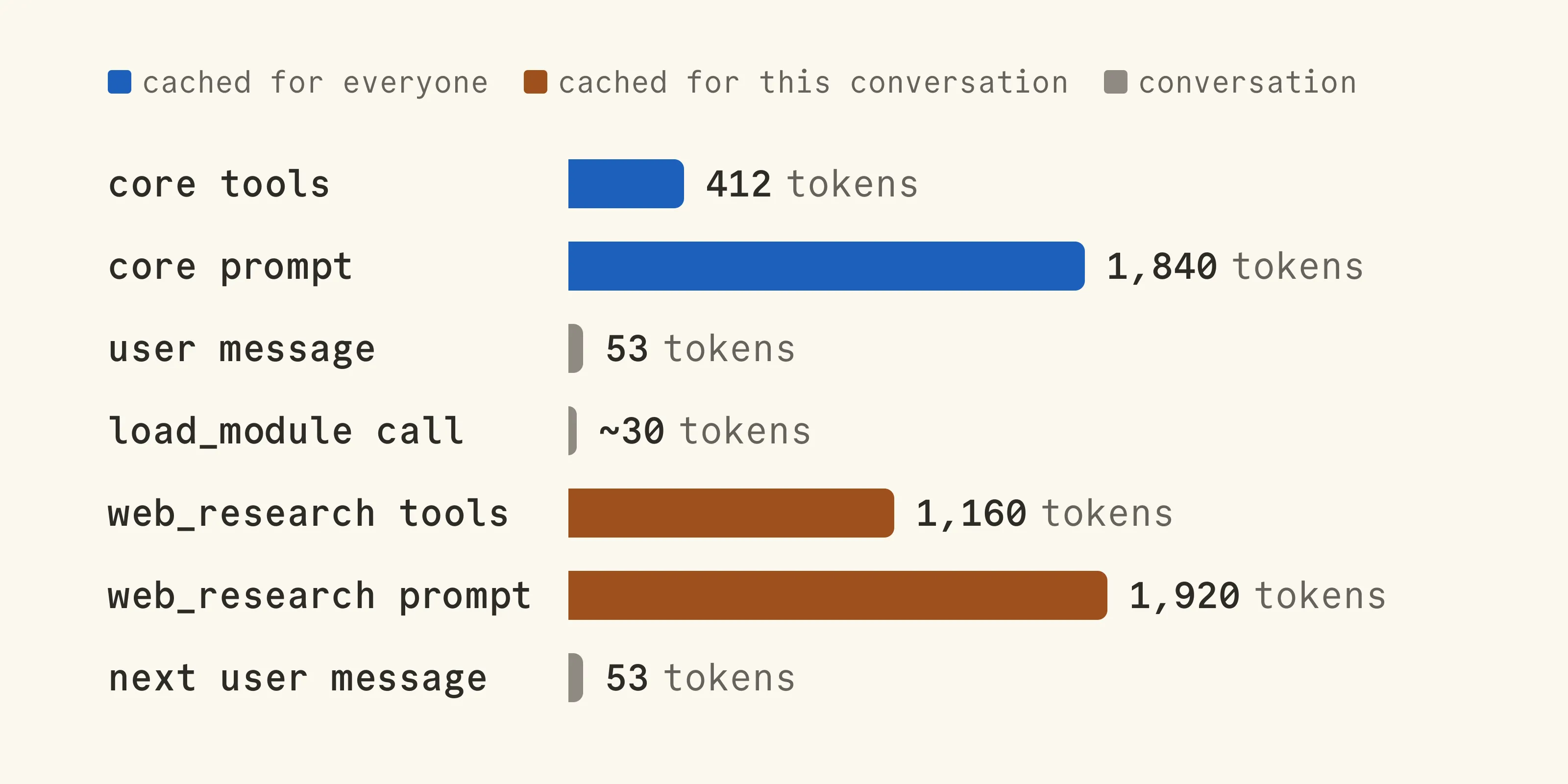
You might be wondering why not just add the tools to the tools list when you need them. OpenAI renders the context in a fixed order, tool definitions first, then developer messages, then the conversation, and the cache only matches an identical prefix. So changing tools mid-conversation rewrites pretty much everything after it, and you lose the cache for the system prompt and the whole history.
The math
With the core cached, the prompt and tools now cost this per request:
That’s 81% less than the $0.00012 from before. And when the cache expires, the write goes from $0.0015 down to:
Modules do cost something though. A module sits after the conversation, so its cache only belongs to that conversation and isn’t shared with other users. That means every conversation that loads web_research pays for the write once:
and then $0.0000308 per turn after that. If we take a 10-turn conversation where the modules get loaded on the first turn, this is what the prompt and tools cost per 1,000 conversations:
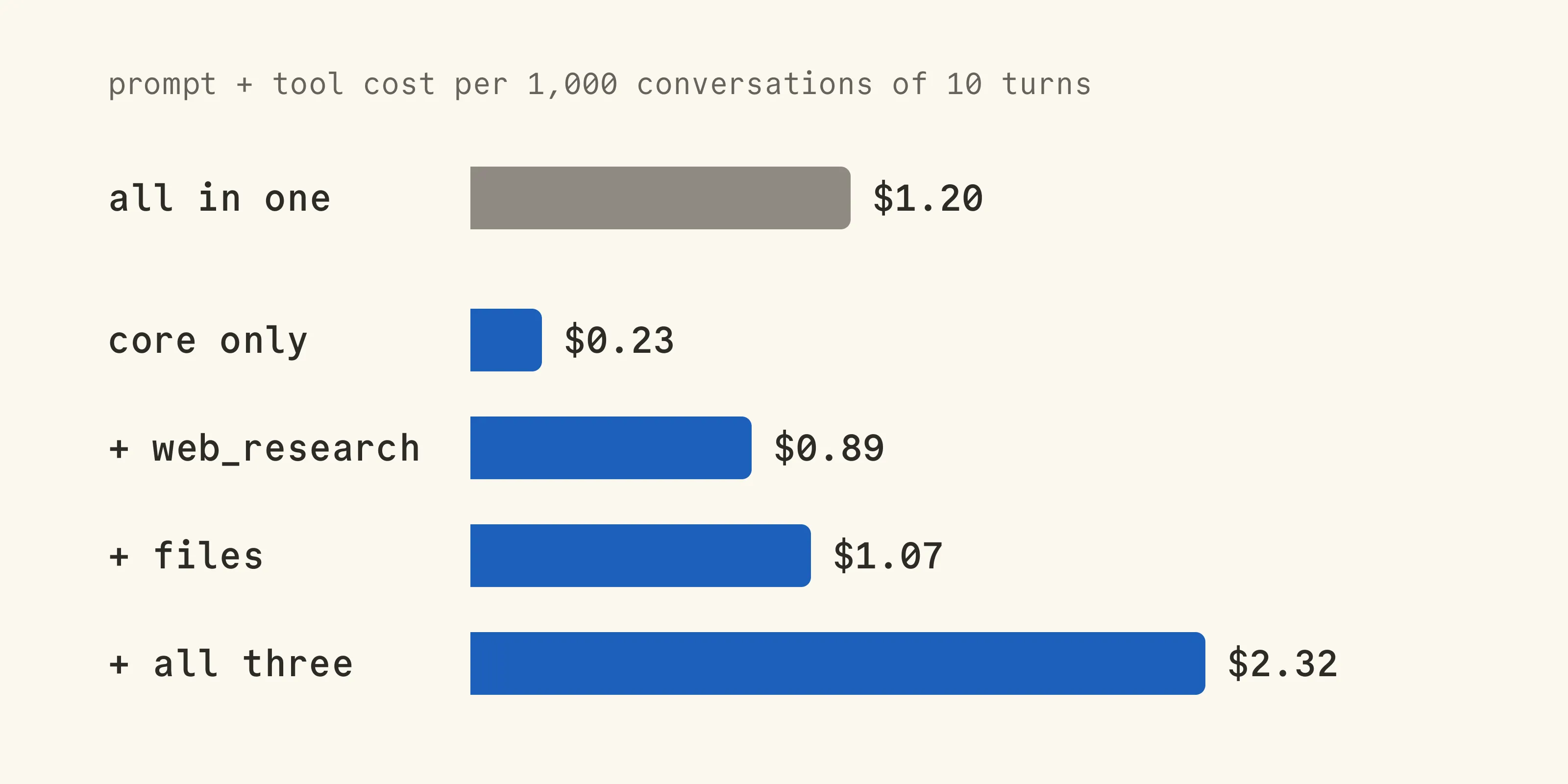
If a conversation never needs a module, it’s 81% cheaper, and even with one module it still comes out ahead. Loading all three though costs almost twice as much as the all-in-one prompt, because each module pays for its own write instead of using the shared cache.
So it really depends on how people use your app. Let’s say 70% of conversations never load a module, 20% load web_research, 7% load files and 3% load all three. Per 1,000 conversations that’s:
compared to $1.20 with everything in one prompt, so about 60% less.